Progress on self-publishing!

sir-mador-s-spear-brake-all-to-pieces-but-the-other-s-spear-held

So! Yesterday (was it yesterday? Actually, I think it was Friday), I finished my edit/proof read of my novel. That’s right! All five-hundred and something pages checked, double-checked, and tweaked. Surprisingly the new format of the novel made catching things that I’d never noticed before much easier – such as missing speech marks, duplicated words, or words that had clearly hung on despite the rewriting of the sentence. Inevitably, I will have missed one or two things. My three-pronged approach of reading in my head, reading aloud, or getting dictation & speech to read for me can’t have picked up everything. As a result I have sent my final draft off to my proof-readers, and am awaiting their verdict. I shall have to resist the urge to edit again when comments come back – after all this is the start of a story, and there are always so many ways to tell it.

In the meantime I am trying to work my way through the minefield that is writing your own blurb. I should be able to manage it, I’ve written a novel, right? I edited that novel, then after that I did the unthinkable – I trimmed down 120,000 words into a one-page synopsis. That, at the time, seemed impossible – but as it is often shown, the impossible turned out to be possible after all. 200 words or less is a much shorter order to work to, however, and (so far) I’ve found it’s the sort of thing that can only be approached in short bursts.

One draft – a splurge of sentences on the page that make little sense. Break. Another draft, writing an alternative to the above. Research, lots of research – or at least just a little bit – looking at book blurbs in your own library and googling ‘how to write a book blurb’, only to find that there are several ways one can do it. Writing again, with these strict guidelines in mind. Deleting all the above because, surprisingly, the guidelines were actually quite helpful. Break, because what you wrote needs to sink in before you can edit it. But you’re there, you’ve got the tone and the content right. Now it just needs to… pop.

Other than that, my schedule at the moment includes getting other aspects right – in particular things like text for the acknowledgements. As I am destined to a reasonable wait before I can continue with the whole publishing thing (everything is on hold now until the book itself is ready to be uploaded), I will probably return to some of the other points on my to-do list for a while. Scanning my grandfathers’ slides of plants and butterflies is one, illustrating a few projects is another, working on a children’s book is my third (nearly done, I just need a decent ending). Presently I am battling the urge to try restructuring my book completely, just to see if it would be better (or worse). Knowing when to stop tweaking is a good skill, and it’s easier to do when working on a painting or drawing. The result of a drawing is usually completely visible on one page, and is therefore easier to conclude that it is, actually, finished. Perhaps someday I will be able to transfer such understanding to my written work, and the whole process may become a little easier to draw a line under.
10 things I have learned whilst proof reading

  1. Unless you are a professional proof reader, it is inevitable that you will always miss something (but then I wonder, do professional proof readers miss things too?).
  2. It is surprising how one can read a manuscript multiple times, catching double-spaces, incorrectly formatted dashes and dots, missing words, extra words, and yet on the hundredth read discover an entirely overlooked error – in my case missing speech marks at the end of some lines.
  3. Relying on speech & dictation to catch things for you is a very useful method (particularly for spotting typos) – but it is not to be relied upon 100%. Only yesterday my reader Alex decided to add ‘that’ into my sentence. Clearly he thought the sentence was better with an extra demonstrative pronoun.
  4. A formatted manuscript is much easier to spot mistakes in than a non-formatted manuscript. I suppose it’s the increased space between lines, the fewer words per page, or something.
  5. Fewer words per page and a smaller page size means that you’ll have twice as many pages to proof read, yet somehow because of this the whole task seems to go faster (120 pages per day! Woo!).
  6. Knowing when to stop proof reading is a real issue. How many times do you go through it? With each change lies the potential for fresh mistakes. What if you have a blind spot to the difference between her and his? You meant his, but you typed her. You might not see you typed her until your book is already in print.
  7. I suppose the above is why I am asking friends and family to read through my manuscript for me (trusting, of course, in their superior ability to sense typos in a sentence – much like those who sense a formidable, horrible disruption when one digit is off in pi – can you? 3.141592653589793238462643383279
    50288419716939937510582097494459230781640628620899862803482
    534211706798214808651328230664709384460955058223172535940812
    848111745028410270193852110555964462294895492038196442881097
    56659334461284756482337867831652712019091456485).
  8. The fear of releasing one of those books that we’ve all come across – when you’re on page seven, and a word is missing, or wrong, or repeated – is quite possibly irrational, but also very real.
  9. Don’t try to proof read if you’re tired or hungry. Unless you’re in the right frame of mind whilst reading, you will approach the end of the chapter with the feeling you have not done as well as you could have, and then resign yourself to combing through the same pages again later, when you’re feeling a little less useless.
  10. With all the above taken into consideration, a novel can always be amended to fix any overlooked errors. After all, we all know that’s what editions are really for, right?

10 things I have learned whilst formatting a book in MS Word

  1. Apparently, if you’re going to be making changes to your book after formatting, MS Word is your best choice as it’s easier to edit content. That, and InDesign is just scary if you don’t know how to use it at all, really – so what hope would one have when it comes to formatting a whole novel?
  2. You’ll probably start with a font size which will make your book seem shorter. But then you’ll change the page size, line spacing and margins, and suddenly your book will seem longer. Much longer. Not good if you’re self publishing and more pages=less profit.
  3. It is surprising how bookish your book will look with only the things mentioned in (2) formatted. Because yes, surprisingly, there is more. Once you do get to the ‘more’ part, MS Word will start to seem like a living, thinking thing that does illogical things just to annoy you. This sense of working with a living, thinking thing will not deter you from insulting it frequently with all kinds of profanities, however, and you will feel no guilt in doing so.
  4. If you’re a first time self-publisher and have no experience in publishing, well, anything, you’ll inevitably have to refer to other (more traditionally published) novels to figure out what yours should look like. This is useful, and you should do it. Pick one book you like the look of and use it as a point of reference. Preferably something from your genre. After all, you don’t want your crime-thriller looking like erotic fiction (though if it’s all about tension anyway, what’s really the difference?).
  5. Referring back to point (3). You will format, you will think you are done, and then you will notice something that isn’t as it should be. For example, paragraphs breaking on the next page, thus giving you uneven line-to-page frequency. (Tip: if you have this problem, uncheck window/orphan control in format/paragraph for the whole document to fill your pages completely with lots of lovely prose). There will be other things, but at least you will feel accomplished when you fix them.
  6. Even if you do the above and check off window/orphan control, if you have inserted chapter dividers that look fancy, this will knock off your layout on your lovely new-chapter pages. Still trying to figure out how to fix that one without simply changing the font size of the empty line above said fancy chapter dividers (because, somehow, that seems crude).
  7. Headers and footers are important – format them well! Choose ‘different odd/even pages’ and make sure you mirror your margins through format/document. This does something else to make it look more bookish. From looking at various books I have determined that authors usually have their name on the even page and the title of the book on the odd page.
  8. Inserting Section Breaks is an absolute nightmare. Seriously, first you figure out that you’re supposed to inset a Section Break relative to whether it’s an odd page or an even page, then you figure out how to get the page numbers to start at ‘1’ on the fourth actual page, and then you realise through exporting to PDF that each new Section Break has skipped a page number and thus created a ‘phantom page’ with nothing on it before every chapter in your document. Huzzah.
  9. Confident in all the abilities you have learned (as listed above), you calmly go through the document to rectify the problem, only to have one Section Break change reset all the others into a paradoxical chaos of wrong numbers and jumps and gaps where your book is suddenly longer or shorter than it actually is (but not really, hence the number-paradox).
  10. You fix the above (9) without screwing everything else up. But you’re still editing or there’s a few things left to change. You now wish you had finished the final draft before even attempting formatting, because you’re terrified the slightest change might destroy everything you’ve worked so hard to achieve. Who knows? Maybe a paragraph more or less will confuse everything and you’ll be stuck undoing everything you’ve done in order to redo it properly. Let’s hope not.

10 things I have learned whilst making a book cover

  1. Pre-existing book covers are your friend. Look at them, examine them and focus on studying books in your genre, but don’t be too disappointed if your self-publishing platform doesn’t support the trim size you inevitably fall in love with as a result (five by seven, five by seven!).
  2. Make sure the cover correlates with the interior feel of the actual novel (and then dance about celebrating your own brilliance when you think of something that looks really cool).
  3. Having twenty layers live at once in Photoshop will destroy your computer. No, really. The fan on mine has just… died, or something.
  4. After spending four hours trying to align font at the bottom of your page to font at the top of your page, your eyes will go funny and everything will look wonky anyway.
  5. The longer you stare at the block colour red, the more it begins to look like some whacky gradient.
  6. Apparently due to variations in book binding the artwork for the cover will sometimes end up on the spine, and spine on the cover. You will be advised to avoid sharp lines and complex patterns, so naturally use them anyway.
  7. You should (and probably will) print out your book cover and wrap it around some other less important novel just to see what it looks like on a bookshelf (mighty good, I tell you).
  8. An actual, real life plastic ruler can be very helpful when determining layout spacing on your screen for the less technically gifted of us.
  9. Asking (non-graphic designery) people their opinion on your artwork can be confusing. Just focus on the things they agree on, and ignore anything they don’t.
  10. Making a book on a template before you have your final page count is just asking for trouble. You think you’re finished, then a last-minute cut adds or subtracts a page or two. New spine thickness, new document! Yeah!

Part-time post

By now you’ve probably sussed the title of this blog in that I’ve been absent for a couple of days. I’m not yet sure at which frequency I will ultimately end up posting at, but as long as it’s higher than zero I feel I will be doing well. I’ve been up to a lot in the past few days, though mostly it’s been the same thing, cutting my novel on paper.

As of yet I’ve no idea how many words I’ve lost, but the experience in itself has been surprising. How, after roughly five re-writes and several more proof-reads are there still errors? Not many, granted, but one missed missing word can be catastrophic enough if not caught – as can typos, punctuation errors – and even worse: whole scenes that just don’t fit with the rest of the narrative.

It’s easy to end up with a scene that doesn’t work, particularly when said scene was written afterwards and inserted in the hopes it would further develop a character. The scene in question continues something that has already been resolved, yet expands the issues raised and gives a good relationship boost to the two main protagonists. As a result it must either be cut or re-written (we’ll see how the word count goes). Three people missed it when reading through it, though one reader said they were just too caught up in the storyline to even notice the discrepancy. I suppose that’s why people hire editors.

And so begins the three-day process (hopefully!) of trawling through my corrections in Word. Each revision always risks new mistakes, much like some sort of wordy vicious cycle, but then I suppose that’s why people hire proof-readers, too. Not something that’s doable without a substantial budget, so I’ll have to make do.

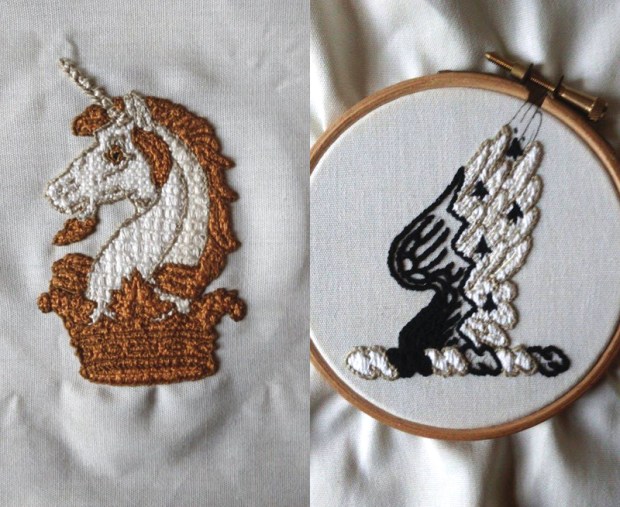
In other news I have been embroidering a bit this week, my family crest for the name Mackworth (a raven’s wing with ermine, see below). This goes with the unicorn head for Praed, though often it’s only the unicorn head which is depicted for both. Heraldry is another one of my interests, and I look forward to seeing these two finished and framed next to one another.

Crests for Mackworth-Praed, embroidered by M. L. Mackworth-Praed, 2015.
Crests for Mackworth-Praed, embroidered by M. L. Mackworth-Praed, 2015. Embroidered with two stitch types: stem stitch and couching, the stitch types used for the Bayeux Tapestry.

That’s all for now, it’s time to steam through this edit. Hopefully afterwards I’ll have a more realistic page count and can finish formatting and start uploading to Amazon. I will keep you updated on any progress. Until the next part-time post!

What I’ve been up to

Today has been busy. Impatient to get some idea of what my book might look like once it is finished, I have been fiddling about with formatting in MS Word. With no clue where or what to start with, I found a very helpful website (http://www.diybookformats.com/mswordtemplates/) and have managed to set my margins, my paper size, choose a font, and even make chapter dividers in photoshop which match the feel of my draft design for my book cover. Being an arty person, I am very excited by this small achievement (it looks really cool).

Less encouraging is my page count. Yes, I know my final draft is not yet done, and having carved through about fifty pages today I am fairly certain that it will end up being about 20 A4 pages shorter than it is now. In my new layout however, the book as it is (140,000 words) is close to six-hundred (5.25 x 8) pages. I had assumed that publishing your own book might give you greater freedom concerning word count, but after doing Amazon’s royalty calculator I have discovered that my novel would cost me 50p per book to print in the UK. Not the 30-70% royalties I had in mind!

Before settling on the decision to self-publish I did approach the crowdsourcing website, Unbound. Set up by writers Dan Kieran, Justin Pollard and John Mitchinson, Unbound purports to let the readers decide which books get published through a process in which authors present pitches on Unbound’s website. These pitches then receive pledges (payments) from future readers. Only the pitches that reach their target (of about £15,000 from what I can tell from their FAQs [please do correct me if I am wrong]) get published.

It sounded perfect. But, of course, to avoid being swamped by endless pitches, Unbound do have a submissions process. Great for the works that make it through, but that means those works have (ironically) been chosen by the publisher. There is an eight-week wait to get to the top of the slush pile, so percentage-wise not many submissions seem to make it past the selection process (my pitch was one of them). Basically Unbound seems to be a publisher with the best of both worlds – no upfront costs to publish their chosen author’s works, because the readers (may or may not) cover that for them.

Crowd-funding in publishing still seems to be relatively new, and whilst exploring my options I did come across several other sites that seemed to adopt the same concept as Unbound, with the difference that any pitch is posted. So far however, these websites only seem to publish e-books with a much lower crowd-sourcing target (for one of these sites the target was £500 per book). Others claimed to be free, but with the surprise of pop up adverts in your novel when anyone reads it, and (let’s be honest) no author wants their masterpiece repeatedly interrupted by weight-loss ads.

Unbound was tempting for me, because at 50% royalties as well as a paid-for investment in your book concerning editing, book cover and proof-reading it sounded like the best deal. It’s worth a go if anyone out there hasn’t tried it already, particularly if you have a large social media following – it’s one of the things they ask you when you apply because the more followers you have the more books you’re likely to sell. It is discouraging to find that yet another creative endeavour essentially boils down to a popularity contest (or, you could argue, a large social network), but this is already endemic in many artistic fields and is hardly new. Followers = distribution = wider market = more sales. It is becoming the case in the fashion industry, with models with higher numbers of followers getting booked for bigger jobs. Free advertising makes perfect sense.

Ultimately, the author knows what will be a good fit for them, but unfortunately for us writers we’re not usually the ones who get to choose. I am excited about self-publishing though. It’s a challenge, a test to see if I can do it. Can I be editor, designer, agent and writer all at the same time? We’ll find out when it’s released. I’ve already announced my intention on Facebook, and though my social network is modest I’ve had encouraging feedback (and great encouragement). They’re probably just pleased that I’m finally taking the initiative to get it out there – I have been harassing them all with novel-related updates over the years.

I’m half-way through my revision. I caught a scene that referenced something that had already been resolved earlier in the book, so I think as editor I am doing well. I will post up artwork updates as I create them and closer to the release. In the words of most people everywhere, ‘let’s do this!’